Plugin Workflow Overview
The objective of this article is to provide a high-level understanding of how 1Gateway workflows are structured and how plugins work together to build integrations between systems.
In 1Gateway, integrations are designed as modular, configurable workflows composed of plugins, mappings, routing logic, and endpoints. Instead of developing custom connectors or waiting for new product releases, integrations can be built and adapted directly through configuration. When advanced customization is required, scripting can be applied at any point within the workflow.
This flexible workflow model can be applied to a wide range of use cases, including ServiceDesk integrations, monitoring and dashboard integrations, CMDB synchronization, and many other system-to-system integrations.
Regardless of the specific use case, the architecture follows the same core pattern:
Trigger → Route → Transform → Communicate → (Optional) Feedback
Workflow Stages
Trigger – Get data from an external system
Every workflow begins with a trigger. This defines how messages enter the integration.
-
Webhook Plugin receives data from external systems in real time. Used when an external system pushes events to 1Gateway.
-
Timer Plugin starts a workflow on a scheduled interval. Used to generate a message periodically. This is the starting point for polling an external system.
Route – Deciding the Next Step
After a message enters the workflow, it often needs to be routed based on predefined rules. Routing is done through the Next Hop or Queue in the plugin configuration. In cases where specific rules need to be applied to decide where to send the message next, a Switch plugin is used.
- Switch Plugin routes messages to different paths based on configurable conditions. Used to separate different scenarios (for example: create vs update, priority-based routing, or message type handling). Routing keeps workflows structured and easy to maintain.
Transform – Preparing the Data
Most integrations require transformation between systems. In 1Gateway, best practices dictate that messages should always be transform from/to a Normalized format, which allows to extend integrations with less effort.
- Message Mapper Plugin transforms and prepares data before it is sent to another system. Used to map fields, apply rules, enrich data, or prepare messages for external communication. This component transforms the message from the originating external system to the Normalized format and from the Normalized format to the destination external system.
Communicate – Update the External Systems
To exchange data with another system, another message mapper or an out-of-the-box plugin is used to communicate to the destination external system.
- Message Mapper Plugin defines REST calls to update the external system.
- Outgoing Queue Plugin sends messages to an external queue for asynchronous processing. Used when the external system pulls data instead of receiving direct API calls. This supports scalable and loosely coupled integrations.
- Out-of-the-box Plugin refers to the External System plugins available in 1Gateway.
Feedback – Closing the Loop (Optional)
In some integrations, especially ServiceDesk to ServiceDesk, it is important to inform the originating system about the processing result.
- Feedback Plugin sends status or response information back to the source system. Used when confirmation, error reporting, or transaction visibility is required. Feedback is optional but important in transactional or multi-system environments.
Connection – External Systems configuration
Connectivity to the origin and destination external system must be configured separately from processing logic. This separates the configuration of the connection to the external system from the workflow setup. Separating connection configuration from logic improves maintainability and flexibility.
- Endpoint Plugin defines how 1Gateway connects to an external system. Used to configure URLs, authentication, and connection settings that can be reused across the workflow.
Visual representation
The diagram below illustrates how a typical 1Gateway integration workflow is structured and how the different plugin types fit together.
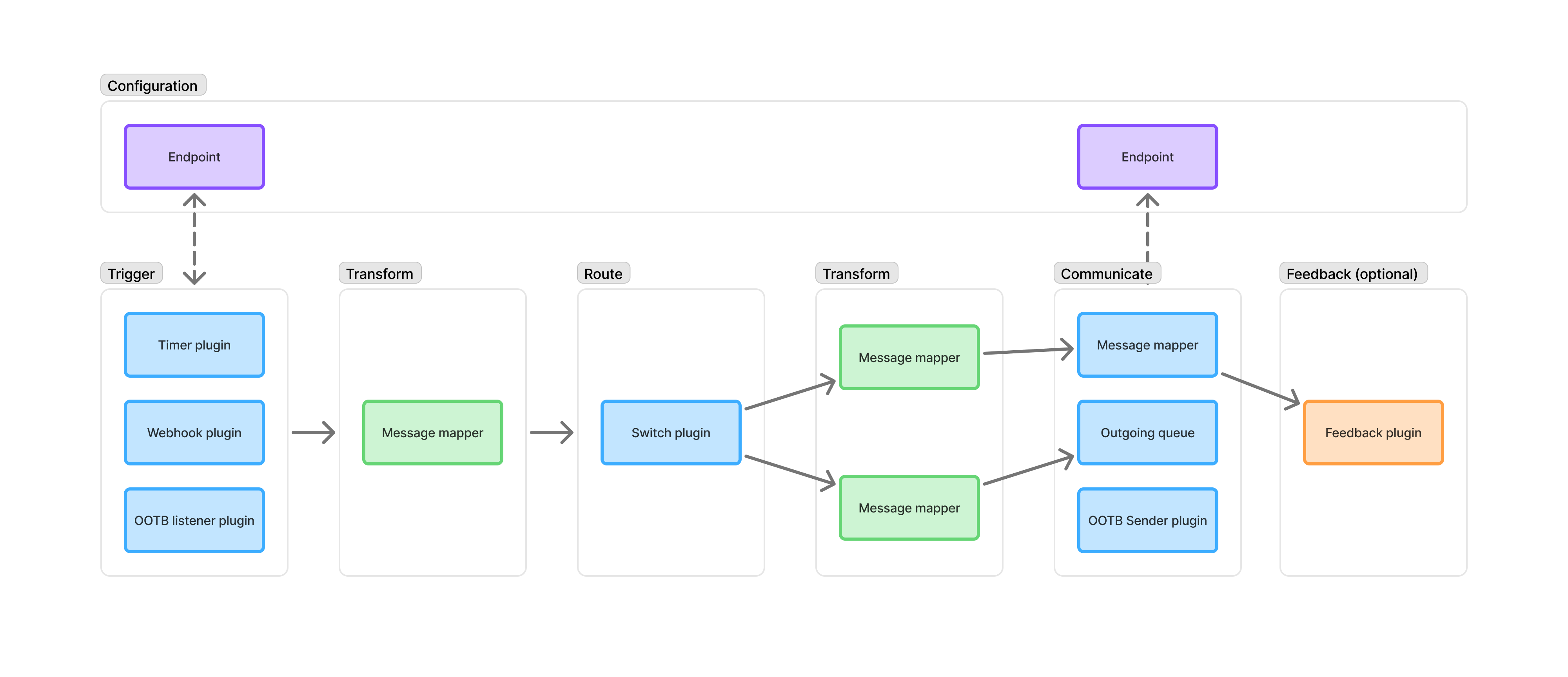
Workflow Overview (Left to Right)
- Configuration Layer (Top): Endpoints are configured separately and referenced by the workflow when external communication is required. This keeps connectivity settings independent from processing logic.
- Trigger: The workflow starts when a message enters the system through one of the trigger plugins (timer plugin, webhook plugin, OOTB listener plugin)
- Transform: A Message Mapper prepares or normalizes the incoming data before routing decisions are made.
- Route: The Switch plugin evaluates configured rules and determines which path the message should follow.
- Transform (Per Route): Each route can apply additional Message Mappers to adapt the message to the specific scenario (for example, create vs update).
- Communicate: The processed message is sent to the external system using one of the communication plugins (message mapper plugin, outgoing queue plugin, OOTB sender plugin)
- Feedback (Optional): If required, the Feedback plugin generates a response or status message back to the origin.
Key Concepts Shown in the Diagram
- Workflows are modular and sequential.
- Routing can create multiple processing paths.
- Endpoints are reusable configuration elements.
- Transformations occur multiple times in the workflow.
- Feedback is optional and depends on the integration requirement.
The visual representation highlights that 1Gateway integrations are not always single connectors, but structured workflows composed of configurable building blocks.
Importance of this workflow model
Every integration follows the same structure, once the workflow model is understood, it can be applied consistently across different use cases. The workflow-based approach allows:
- Rapid integration development without custom connector development
- Clear separation between routing, transformation, and connectivity
- Flexible adjustments without product upgrades
- Reusable, modular integration components
- Optional scripting only when advanced customization is required
Workflows in 1Gateway
In 1Gateway, workflows are organized using tabs. Each tab represents a separate integration flow or logical integration scenario. This allows you to clearly separate different use cases within the same 1Gateway instance.
Tabs help structure integrations by purpose, direction, or system combination.
For example:
- A tab for Monitoring Data (e.g., alerts or metrics flowing into another system)
- A tab for CMDB Synchronization
- A tab for Internal Reporting or Dashboard Feeds
- A tab for Endpoint configuration
Each tab contains its own set of plugins arranged as a workflow. Workflows in different tabs may communicate with each other. Using separate tabs provides:
- Clear separation between integration scenarios
- Logical grouping of plugins
- Improved readability of complex environments
- Better maintainability when integrations grow
Best practices
For bidirectional integrations (for example, ServiceNow ↔ Freshdesk), it is common to create two separate tabs, one per direction. This keeps each workflow simple and easier to manage.