Reporting an Issue
To ensure a fast and effective resolution, please follow the steps below to gather diagnostic data before contacting support.
1. Prepare Your Information
To resolve your issue quickly, please ensure you have collected these two items from your 1Gateway instance:
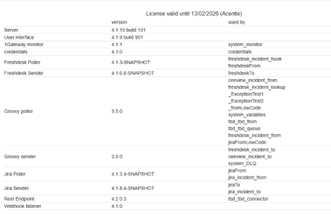
📸 About Page Screenshot
Required for versioning and environment architecture details.
📂 Support File
Generates a diagnostic package containing system logs.
How do I collect this information?
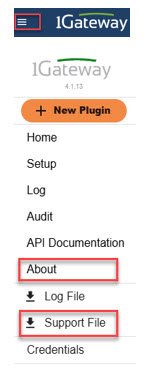
- Click the menu icon (top-left) in the 1Gateway UI.
- Select About to take your screenshot.
- Select Support File to download the diagnostic package.
2. Submit Your Request
Contact your Partner
We highly recommend first contacting your authorized 1Gateway Partner. They have direct knowledge of your local configuration and can often provide the fastest assistance.
Contact 1Gateway Support
If you need to escalate to us directly, please send an email to our technical team:
Support Email
Checklist
To avoid delays, please ensure your email includes:
- Clear Description: What happened and steps to reproduce the issue.
- About Page screenshot
- Support file