Queue Routing
Queues are used in 1Gateway to enable asynchronous message processing. They allow messages to be stored and processed later by another plugin.
Queues are typically used when:
- Processing high volumes of messages
- Decoupling systems
- Ensuring messages are not lost if a destination is temporarily unavailable or there is an unexpected Shutdown
How to Configure a Queue
Queues are configured within each sender plugin.
Each plugin can define a queue that determine which messages it will consume.
To access queue configuration:
- Select the plugin you want to configure
- Set the
Define a queueflag totrue.
Queues are defined with a name and a RabbitMQ topic that determines which messages a plugin will consume.
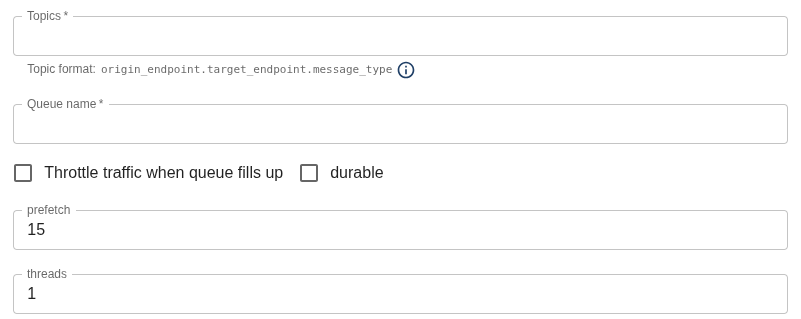
| Plugin Type | Field | Supported Values | Description |
|---|---|---|---|
| Outbound | Topics | Any string | Defines which messages should go on the sender plugin queue. The format is: source_endpoint.destination_endpoint.message_type. |
| Outbound | Queue name | Any string | Name of the queue used to process the messages for a specific sender plugin. |
| Outbound | Throttle traffic when queue fills up | true / false | If enabled, the system limits or reduces message traffic when the queue reaches capacity. This prevents saturation, performance issues, or message loss. |
| Outbound | Durable | true / false | Marks queues/messages as persistent in RabbitMQ. Durable queues survive server restarts, ensuring message integrity and availability. |
| Outbound | Prefetch | Integer | Number of unacknowledged messages a worker can receive before processing them. Controls consumer load and flow. |
| Outbound | Threads | Integer | Number of parallel processing threads available to handle messages simultaneously. Improves concurrency and throughput. |
Queue Topic
The topic follows this format: source_endpoint.destination_endpoint.message_type. Multiple topics can be defined for a single queue separated by ;.
Wildcards
You can use wildcards to make queue definitions more flexible:
*matches any value in a single part of the topic#matches all messages, regardless of source, destination, or type
Wildcards can be used in any part of the topic:
Examples:
*.CASDM.CASDMTicketUpdate
In this example:
*matches any source endpointCASDMis the destination endpointCASDMTicketUpdateis the message type
This means the plugin will consume all messages of type CASDMTicketUpdate sent to the CASDM destination, regardless of the source.
More examples:
webhook.*.NormalizedIncident
*.CeeView.NormalizedMetric;*.CeeView.NormalizedAlarm
*.internal.*
#
Important:
- Queue names must be unique across the system
- Two plugins cannot use the same queue name
- This ensures messages are routed correctly and avoids conflicts