Credential Store
Overview
The Credential Store provides a secure, centralized location for managing credentials used by 1Gateway to connect to external systems. Credentials stored here can be referenced by certain out-of-the-box (OOTB) plugins and by custom Groovy connectors.
While the Credential Store remains supported, it is considered legacy for new integrations. New developments should use Endpoint-based credential configuration, which provides better structure, security, and maintainability.
When to Use the Credential Store
The Credential Store is applicable in the following scenarios:
- Existing integrations that rely on legacy credential references
- Out-of-the-box plugins that still require credentials from the store
- Custom Groovy connectors where Endpoint configuration is not yet available
For all new integrations, Endpoint configurations are the recommended approach.
Accessing the Credential Store
To access the Credential Store:
- Open the 1Gateway user interface
- Navigate to Left Menu → Credentials This section displays all configured credential profiles.
Supported Credential Types
The Credential Store supports multiple credential types to accommodate different external systems and authentication mechanisms.
| Credential Type | Description |
|---|---|
| FTP | Defines connection credentials for an FTP server, including host, username, and password. |
| Application | Authenticates against an application by posting a JSON payload containing username and password to a configured URL. Subsequent requests rely on session cookies. |
| SQL | Defines JDBC connection credentials for connecting to a SQL database. |
| NTLM | Microsoft NTLM authentication for systems requiring Windows-based security protocols. |
| SMTP | Credentials used for sending email via an SMTP server. |
| Basic | Basic authentication using a Base64-encoded username and password, typically for HTTP-based integrations. |
| Proxy | Authentication details used when routing traffic through a proxy server. |
| OAuth | OAuth-based credentials for delegated access to external systems without sharing passwords. |
Credential Profiles
Each credential entry is stored as a credential profile and includes:
- A Profile Name: A meaningful identifier that describes the purpose or target system (for example:
influxdb-auth,ftp-partner-a). - Authentication-specific configuration fields: These vary depending on the selected credential type.
The profile name is used by plugins and scripts to reference the stored credentials.
Credential Configuration Fields
Each credential profile in the Credential Store is created by selecting a credential type and providing the required configuration fields. The available fields depend on the selected credential type and determine how 1Gateway authenticates to the external system.
FTP Credentials
Used to authenticate against an FTP server.
| Field | Description |
|---|---|
| FTP Server | Hostname or IP address of the FTP server |
| Port | FTP server port |
| User | Username used for authentication |
| Password | Password associated with the FTP user |
Application Credentials
Used for applications that authenticate via a login endpoint returning a session or cookies.
| Field | Description |
|---|---|
| Logon URL | URL to which the authentication request is sent |
| User | Application username |
| Password | Application password |
SQL Credentials
Used to authenticate against a relational database.
| Field | Description |
|---|---|
| Connection String | JDBC connection string for the database |
| User | Database username |
| Password | Database password |
NTLM Credentials
Used for systems requiring Microsoft NTLM authentication.
| Field | Description |
|---|---|
| NTLM Domain | Windows domain name |
| NTLM Workstation | Workstation or client host name |
| User | NTLM username |
| Password | NTLM password |
SMTP Credentials
Used for sending email via an SMTP server.
| Field | Description |
|---|---|
| Email Server | Hostname or IP address of the SMTP server |
| Port | SMTP server port |
| Encryption | Transport encryption type (nossl, ssl, tls) |
| Need Authentication | Indicates whether authentication is required (true or false) |
| User | SMTP username (required if authentication is enabled) |
| Password | SMTP password (required if authentication is enabled) |
Basic Authentication Credentials
Used for protocols or integrations that require only a username and password (for example HTTP Basic authentication).
| Field | Description |
|---|---|
| User | Username |
| Password | Password |
Proxy Credentials
Used to authenticate through a proxy server.
| Field | Description |
|---|---|
| URL | Proxy server URL |
| User | Proxy username |
| Password | Proxy password |
OAuth Credentials
Used for OAuth-based authentication and token acquisition.
| Field | Description |
|---|---|
| Client ID | OAuth client identifier |
| Grant Type | OAuth grant type |
| Client Secret | OAuth client secret |
| Token URL | URL of the OAuth token endpoint |
| User Password | Resource owner password (used when applicable to the grant type) |
Usage
Usage in Out-of-the-Box Plugins
Some out-of-the-box plugins require credentials to be selected from the Credential Store.
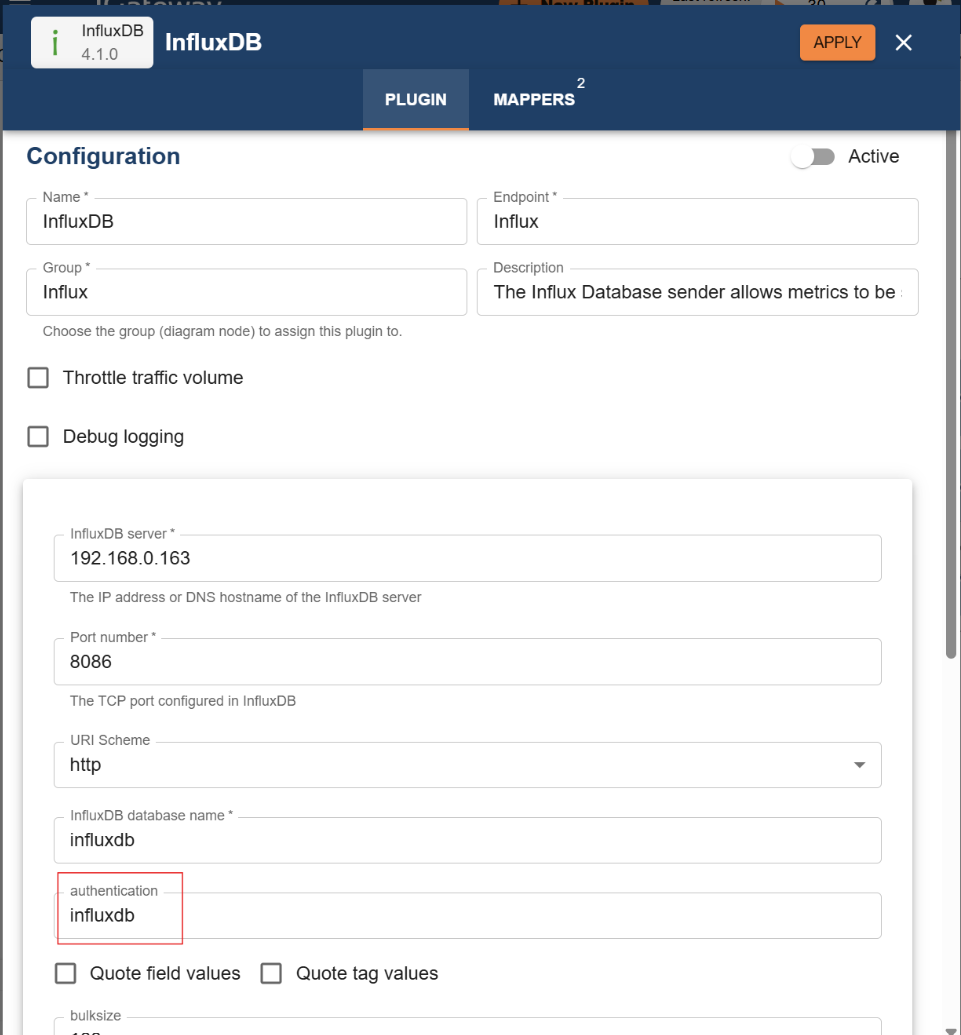
Example: The InfluxDB plugin includes a field for authentication. This field must contain the credential profile name configured in the Credential Store. At runtime, the plugin retrieves the credentials securely and applies them to the external system connection.
Usage in Custom Groovy Plugins
Custom integrations may use Groovy plugins to connect to external systems programmatically. For HTTP-based requests, credentials from the Credential Store can be applied automatically by setting the authentication profile in the script.
Example:
http = option.rest
http.setAuth("custom")
In this example:
"custom"refers to the credential profile name. The authentication details are automatically applied to all HTTP requests executed by the script
Recommendation for Groovy Integrations
Although the Credential Store can still be used in Groovy plugins, the recommended approach is to configure credentials using the Endpoint plugin. Endpoint-based configuration offers:
-
Better separation of concerns
-
Improved security and lifecycle management
-
Clearer ownership of connection settings
-
Future-proof compatibility