Database Sender
Description
The Database Sender Plugin persists messages from 1Gateway directly into a relational database using JDBC-compatible connections.
Incoming messages (such as metrics or alarms) are mapped via configured mappers (e.g., metric2database or alarm2database) and inserted into a target database table.
The Database Sender Plugin is commonly used for:
- Long-term metric storage
- Analytics and reporting
- Exporting monitoring data to data lakes or analytical databases
Supported Databases
The Database Sender Plugin uses JDBC and therefore supports a wide range of databases.
| Database | JDBC Driver | Notes |
|---|---|---|
| PostgreSQL | postgresql | Fully supported |
| MySQL / MariaDB | mysql-connector-j | Fully supported |
| Oracle | ojdbc | Requires Oracle JDBC driver |
| Microsoft SQL Server | mssql-jdbc | Fully supported |
| H2 | Built-in | Mainly for testing |
Any database with a valid JDBC driver can be used, provided the correct connection string and driver are available in 1Gateway. If the JDBC driver doesn’t come out-of-the-box, install it in 1Gateway and restart the service.
Example Database Insert
The plugin inserts mapped fields into the configured table. The actual structure depends on the mapper used.
Example target table:
CREATE TABLE metrics (
  timestamp    DateTime,
  source       String,
  metric_name  String,
  value        Float64
);
Example mapped insert (conceptual):
INSERT INTO metrics (timestamp, source, metric_name, value)
VALUES (?, ?, ?, ?);
Prerequisites
To ensure the Database Sender Plugin functions correctly, verify the following:
- 1Gateway Version: 4.1.2 or later.
- JDBC Driver: The relevant driver must be installed in the 1Gateway environment followed by a service restart.
- Schema Ready: The target database and table must be created manually before the plugin starts sending data.
- Mapping: A valid mapper configuration must be set up to translate 1Gateway fields to database columns.
- Network: Ensure firewalls allow connectivity from the 1Gateway host to the database port.
Sender Configuration
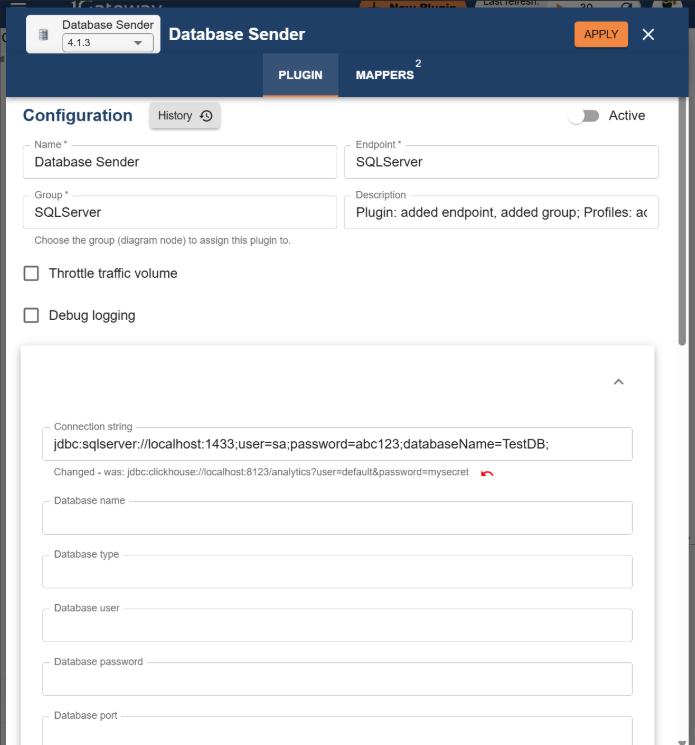
The Database Sender Plugin utilizes a Database Connection Profile to manage credentials and target locations.
Database Connection Profile
| Field name | Supported values | Description | Required | Example |
|---|---|---|---|---|
| Connection string | URL | Full JDBC connection string | No* | jdbc:sqlserver://localhost:1433;databaseName=TestDB; |
| Database name | String | Name of the target DB | No* | TestDB |
| Database type | String | Type of SQL engine | No* | sqlserver, sqlite |
| Database user | String | Username for authentication | No* | sa |
| Database password | String | Password for authentication | No* | abc123 |
| Database port | Number | Port number | No* | 1433 |
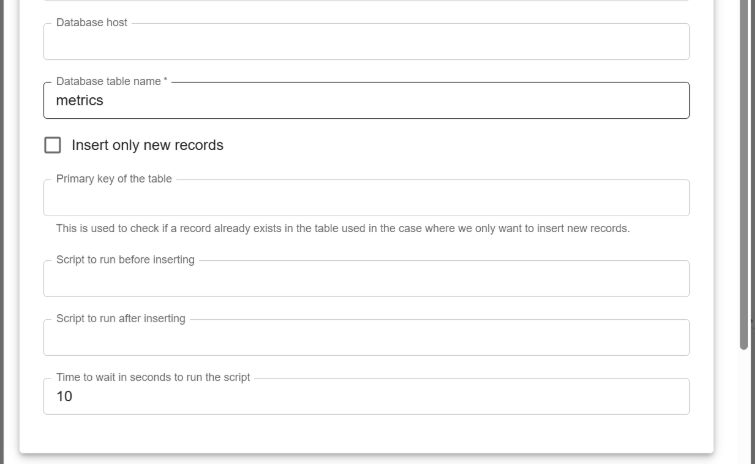
| Database host | String | Hostname or IP address | No* | localhost |
| Database table name | String | Destination table | Yes | TestTable |
| Script before insert | Filename | SQL script to run before data entry | No | beforeScript.sql |
| Script after insert | Filename | SQL script to run after data entry | No | afterScript.sql |
*Not required if a full Connection string is provided.
Message Flow
The following sequence describes how data travels from 1Gateway to your database:
- Ingestion: Message is received from 1Gateway.
- Matching: The topic is matched against the Main Profile criteria.
- Mapping: The message payload is transformed via the configured mapper.
- Resolution: The Database Connection Profile is resolved to establish a session.
- Pre-processing: The "Before script" is executed (if configured).
- Execution: The SQL
INSERTorUPDATEis performed. - Post-processing: The "After script" is executed (if configured).