Ceeview
Sender Description
The Ceeview sender plugin sends metrics, events, and assets from 1Gateway into Ceeview. The messages are mapped to a format that the Ceeview sender plugin can process and converted to a JSON string, which is then sent to Ceeview through the Ceeview REST API.
In the CMDB use case, assets are also retrieved from Ceeview to create a replica collection. Pre-configured rules are used to match existing assets in the Ceeview replica to CI's in other systems. If a match is found, it is recorded in 1Gateway and updated in Ceeview. If its not, a new asset is created. Asset attributes can also be created.
An example of a JSON metric sent to CeeView:
{
  "apiToken": "545d0...",
  "options": "redraw=false",
  "data": [
    {
      "service": "MyService",
      "element": "Madrid",
      "qualifier": "temperature",
      "value": "23.4"
    }
  ]
}
This message shows the current temperature in Madrid.
In the CMDB use case, assets are also retrieved from Ceeview to create a replica collection. Pre-configured rules are used to match existing assets in the Ceeview replica to CIs (Configuration Items) in other systems. If a match is found, it is recorded in 1Gateway and updated in Ceeview. If it's not, a new asset is created. Asset attributes can also be configured.
Prerequisites
- MongoDB installed and configured in 1Gateway (for CMDB use case only).
- Ceeview version needs to be 2.3 or later
- Ceeview token
To access the CeeView token, go to ceeview. Log in and go to Administration. Click on the user. The token is the authentication key shown.
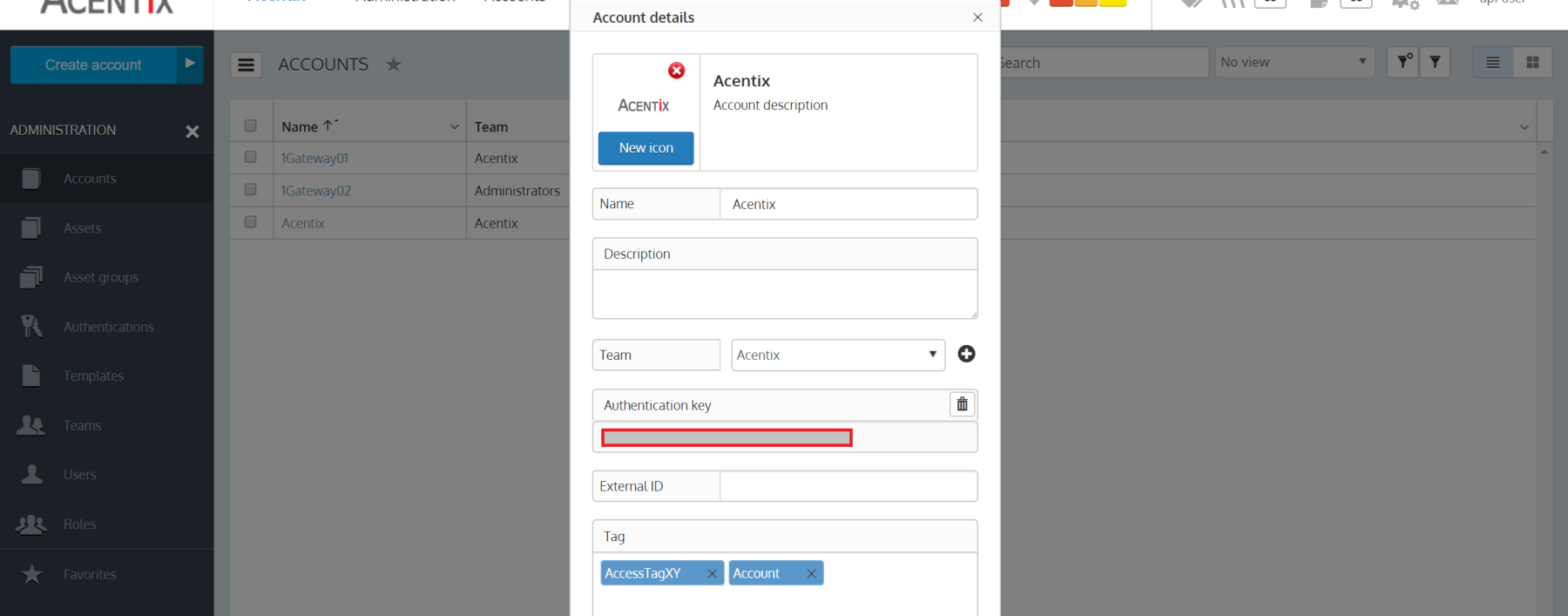 Get the token from Ceeview.
Sender Configuration
The Ceeview Sender Plugin consists of four configuration types, main, metric, event, and cmdb.
All of the fields in the metric and event configurations are the defaults for the messages and will only be populated in the message if there isn't an existing one already.
Main
| Field name | Supported Values | Description |
|---|---|---|
| server | Valid IP address or hostname | CeeView server |
| port number | Valid port number | Valid port number |
| apiToken | Valid API token | Token generated by CeeView for API authentication |
Metric
| Field | Supported Values | Description |
|---|---|---|
| Message type for metrics | Any string | 1Gateway message type for CeeView metrics. Needs to be the same as in the metric2ceeview mapper |
| Default Ceeview asset | Any string | Default asset to associate metric with. |
| Default Ceeview instance | Any string | Default name of metric instance. |
| Default category | Any string | Default metric category. |
| Default Ceeview identifier | Any string | Default string that identifies the source of the metric. |
| Default unit | Any string | Default metric unit type. |
| Default Ceeview type | Any string | Default metric data type. |
Event
| Field | Supported Values | Description |
|---|---|---|
| Message type for events | Any string | 1Gateway message type for CeeView events. Needs to be the same as in the state2ceeview mapper. |
| Default Ceeview monitor name | Any string | Default monitor name. |
| Default Ceeview asset name | Any string | Default asset name. |
| Default account id | Any string | Default identifier for the sub-account. |
| Default Ceeview asset group | Any string | Default name of the asset-group associated with the monitor. |
All of the fields in the metric and event configurations are the defaults for the messages and will only be populated in the message if there isn't an existing one already.
CMDB
| Field | Supported Values | Description |
|---|---|---|
| Do not insert new CIs | Boolean | If TRUE, the plugin won't create new CIs and will only update existing CIs based on the match found. |
| Simulation mode | Boolean | If TRUE, assets are saved in a simulation collection and are not sent to Ceeview. |
| CMDB replica collection | Any string | Name of the CMDB replica collection where assets from Ceeview are stored. Used by matching rules to decide if there is a match between Ceeview assets and other systems CIs. |
| Replica expiration (in hours) | Any integer | Expiration time of the replica collection. If expired, the replica collection will be rebuilt. |
Main
| Field name | Supported Values | Description |
|---|---|---|
| Message type | Any string | Message type of the asset polled for. These assets are inserted in the replica collection and used for matching |
| API suffix | Any string | URL suffix to use. The default value is /mgmt/assets |
| Run interval in seconds | Any string | Interval between two poll cycles |
Rule profiles
| Field name | Supported Values | Description |
|---|---|---|
| Script | Groovy script | Groovy script to evaluate the CI content and search for a match in the replica |
| Run interval in seconds | Any string | Rule priority. Rules are evaluated in ascending order until a match is found |