Inbound Email
Outgoing Description
The Email listener reads email messages from a configured email account through IMAP or POP3 and sends them to 1Gateway. Supports attachments.
Outgoing Prerequisites
- (Optional) Create a directory where to move the emails to after they are read.
- If needed, enable POP3 protocol on the email server
Inbound Configuration
| Field Name | Supported Values | Description |
|---|---|---|
| Email server | Any string | Email server to connect to |
| Email user | Any valid email address | Email address from which to obtain emails |
| Password | Any string | Password of the email user |
| Authentication type | Basic, OAuth2 | Type of authentication to use when connecting to the email server |
| Server type | POP3, IMAP, POP3 with SSL, IMAP with SSL/TLS | Protocol to use when connecting to the email server |
| OAuth Client ID | Any string | Only used if OAuth2 authentication type is selected. OAuth Client ID used for the authentication. |
| OAuth Client Secret | Any string | Only used if OAuth2 authentication type is selected. OAuth Client Secret used for the authentication. |
| Tenant ID | Any string | Only used if OAuth2 authentication type is selected. OAuth Tenant ID used for the authentication. |
| Scope | Any string | Only used if OAuth2 authentication type is selected. OAuth Scope used for the authentication. |
| Token URL | Valid URL | Only used if OAuth2 authentication type is selected. OAuth Token URL used for the authentication. |
| Grant type | Any string | Only used if OAuth2 authentication type is selected. OAuth grant type used for the authentication. |
| Get only new mail | true / false | If set to true, only unseen emails will be retrieved by the plugin. Only works on IMAP/s. Only IMAP/s protocol can set search criteria when retrieving mail. |
| Action to take after reading emails | Mark as seen, Delete, Move to write folder | Defines what to do with an email after it's read. Move to write folder only works on IMAP/s protocol. |
| Number of messages | Any integer | Number of emails to retrieve each poll cycle. Leave empty if all mail should be retrieved. |
| Read folder | Any string | Name of the directory from which to read emails. |
| Write folder | Any string | Directory to move the emails to after they are read (only used if the "Move to write folder" option is selected). |
| Email content format | TEXT, JSON, XML, DELIMITED | Format of the content of the email |
| Delimiter between fields | "Newline" or any character | Defines the delimiter between fields to use in the message (only used if the DELIMITED format is selected). |
| Delimiter between key and value | Any character or string | Defines the delimiter between the key and value of the message fields (only used if the DELIMITED format is selected). |
| Run interval in seconds | Any string | Polling interval in seconds (default is 300). |
Outgoing Email
Outgoing Description
The email sender sends 1Gateway messages as email messages through SMTP. Supports attachments.
Outgoing Configuration
| Field name | Supported values | Description |
|---|---|---|
| Email server | Any string | Email session property. Email server to connect to |
| Port number | Any integer | Email session property. Port number |
| Authenticate | True / false | Email session property. Defines if to authenticate when connecting to the email server with username and password. |
| Email user | Any valid email address | Email with which to log in to |
| Password | Any string | Password of the email user |
| Origin email address | Any valid email address | Origin email address |
| Default destination email address | Any valid email address | Default destination email for the message.* |
| Protocol | TLS, SSL, No encryption | Email session property. Protocol used to send emails |
| Properties filename | Valid filename | (Advanced) If custom properties are needed to create email connection, define them in this file |
| Destination email | Email address | If the message doesn't contain a "destemail" field, the messages will be sent to this address |
- Multiple email addresses can be provided by separating them with a comma, like so: abc@abc.com,abc@def.com,ghi@abc.com
Advanced properties configuration
The properties file is used in cases where the fields in the configuration are insufficient. Define the properties filename and create a file with the desired properties. Example of a properties file:
Example of a properties file:
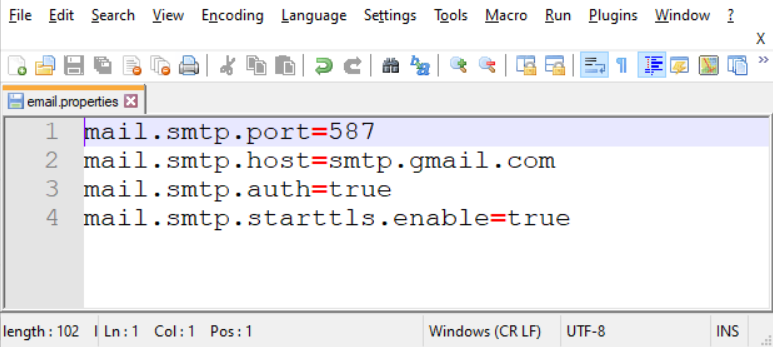
mail.smtp.host=smtp.example.com
mail.smtp.port=587
mail.smtp.auth=true
mail.smtp.starttls.enable=true
mail.smtp.ssl.enable=false
The properties specified in the properties file will take precedence over those defined in the configuration. These fields include:
- Email server (
mail.smtp.host) - Port number (
mail.smtp.port) - Authenticate (
mail.smtp.auth) - Protocol (
mail.smtp.starttls.enable,mail.smtp.ssl.enable)
Make sure to define these fields in the email properties file to ensure proper configuration.